Friday, 18 March 2016

Get CSV Values in SQL

Query:

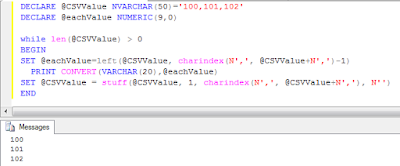
DECLARE @CSVValue NVARCHAR(50)='100,101,102'                  
DECLARE @eachValue NUMERIC(9,0)
 
while len(@CSVValue) > 0
BEGIN
SET @eachValue=left(@CSVValue, charindex(N',', @CSVValue+N',')-1)
  PRINT CONVERT(VARCHAR(20),@eachValue)            
SET @CSVValue = stuff(@CSVValue, 1, charindex(N',', @CSVValue+N','), N'')
END


Output:

100
101
102


Wednesday, 6 August 2014

Upload images to Imgur API version 3 using c#.

Find imgur API documentation at : http://api.imgur.com/

Step 1:

First register the application on the website(www.imgur.com) and collect Client-ID and Secret key.

Step 2:

Code to access the imgur api 

PostToImgur(@"E:\IMG.png","put client-id","put secret key");


imagFilepath : the path of the file on hard disk
apiKey : the client id received after registering the application
apiSecret : the secret key received
 public void PostToImgur(string imagFilePath, string apiKey, string apiSecret)
 {
            byte[] imageData;
            FileStream fileStream = File.OpenRead(imagFilePath);
            imageData = new byte[fileStream.Length];
            fileStream.Read(imageData, 0, imageData.Length);
            fileStream.Close();

            const int MAX_URI_LENGTH = 32766;
            string base64img = System.Convert.ToBase64String(imageData);
            StringBuilder sb = new StringBuilder();
            for (int i = 0; i < base64img.Length; i += MAX_URI_LENGTH)
                {
                    sb.Append(Uri.EscapeDataString(base64img.Substring(i, Math.Min(MAX_URI_LENGTH,                         base64img.Length - i))));
                }

            string uploadRequestString = "client_id" + apiKey + "client_secret" + apiSecret + "&title=" + "imageTitle" + "&caption=" + "img" + "&image=" + sb.ToString();
   
            HttpWebRequest webRequest =                                                                                                    (HttpWebRequest)WebRequest.Create("https://api.imgur.com/3/upload.xml");                         
            //below : replace xxxxxxxxx with client id
            webRequest.Headers.Add("Authorization", "Client-ID xxxxxxxxx");                       
            webRequest.Method = "POST";
            webRequest.ContentType = "application/x-www-form-urlencoded";
            webRequest.ServicePoint.Expect100Continue = false;

            StreamWriter streamWriter = new  StreamWriter(webRequest.GetRequestStream());       

            streamWriter.Write(uploadRequestString);
            streamWriter.Close();

            WebResponse response = webRequest.GetResponse(); 
            Stream responseStream = response.GetResponseStream();
            StreamReader responseReader = new StreamReader(responseStream);
            string responseString = responseReader.ReadToEnd();

            //received response is a xml file. the link to the uploaded file is in between
               the tag<link></link>
           //using regular expression to retrive the link to the image.

            Regex regex = new Regex("<link>(.*)</link>");
            txtLink.Text = regex.Match(responseString).Groups[1].ToString(); 
           
        }


Thursday, 19 June 2014

FolderBrowserDialog in WinForm and display all the files in the folder

                                                                  Fig 1.1

Code :

  private void btnImport_Click_1(object sender, EventArgs e)
        {
            FolderBrowserDialog fbd = new FolderBrowserDialog();
            DialogResult dr = fbd.ShowDialog();
            if (dr == DialogResult.OK)
            {
                string[] files = Directory.GetFiles(fbd.SelectedPath);
                for (int i = 0; i < files.Count(); i++)
                {
                    lstFiles.Items.Add(files[i].ToString());
                }
                lblNo.Text = files.Count().ToString();
            }
        }

        private void btnClearImport_Click_1(object sender, EventArgs e)
        {
            lstFiles.Items.Clear();
            lblNo.Text = "";

        }

Wednesday, 14 May 2014

Create text file in SDCard in Android Studio using Java

Code :
try
{
            FileWriter _fs=new FileWriter("/sdcard/Employee_Info.txt");
            BufferedWriter out=new BufferedWriter(_fs);
            out.write(_data);
            out.close();
            Toast.makeText(this,"Information Saved",Toast.LENGTH_SHORT).show();
 }
 catch (Exception e)
 {
            
 }

where _data=data you want to save to the file

Before Executing this code ,make these settings
1.
Go to Application Explorer :
Application -> app->src->res->AndroidManifest.xml

<manifest>
<application>
</application>
  <uses-permission android:name="android.permission.WRITE_EXTERNAL_STORAGE"/>

</manifest>

uses-permission must be outside the <application></application>

2.
Go to Application Explorer :
Application -> app->src->build.gradle

Add this piece of code inside android {}:
android
{
lintOptions{
        abortOnError false
    }
}

what is lint ?
The Android lint tool is a static code analysis tool that checks your Android project source files for potential bugs and optimization improvements for correctness, security, performance, usability, accessibility, and internationalization.

3.
Provide the size for the SD card in AVD(Android Virtual Device) Emulater


eNjOy tHe cOdInG 

Monday, 7 April 2014

Access the multiple attributes of XML File with LINQ in C#

Xml File 

StudentInfo.xml


Xml file contains attribute named as Name, USN, Address

LINQ QUERY to fetch particular Student Information:

private List<string> GetStudentDetails(string _usn)
{
  List<string> _lstStudentInfo=new List<string>();
  XmlDocument xdcDocument = new XmlDocument();
  XElement root =XDocument.Load(@"H:\CollegeSeminar\StudentInfo.xml").Root;
  
  var result = root.Elements("Student").
         Where(x => x.Attribute("USN").Value == _studentId).                                
         Select(i => new { Name = i.Attribute("Name").Value,
         StudentAddress = i.Attribute("Address").Value,StudentUSN= i.Attribute("USN").Value }).ToList();
  //To get the values
 _lstStudentInfo.Add(result[0].Name);
_lstStudentInfo.Add(result[0].StudentAddress);
_lstStudentInfo.Add(result[0].StudentUSN);
 return _lstStudentInfo;
 
 }

Saturday, 24 November 2012

VB.NET Form Design with code


MODULE CODE

Imports System.Data.OleDb
Module Module1
    Public Cn As New OleDbConnection("Provider=MSDAORA.1;user id=scott;password=tiger")
    Public Fdt As String, Tdt As String, Opt As String, Cont As Int16, Agn As Int16

    Public Sub ConnectDB()
        If Cn.State = ConnectionState.Closed Then Cn.Open()
    End Sub

    Public Function Gen_PK(ByVal Fld As String, ByVal Tbl As String) As Integer
        ConnectDB()
        Dim Cmd As New OleDbCommand("Select Max(" & Fld & ") from " & Tbl)
        Cmd.Connection = Cn

        If Not IsDBNull(Cmd.ExecuteScalar) Then
            Return Cmd.ExecuteScalar + 1
        Else
            Return 1
        End If
        Cmd.Dispose()
    End Function
End Module


STAFF FORM CODE

Imports System.Data.OleDb
Public Class Staff

Private Sub Staff_Load(ByVal sender As System.Object, ByVal e As System.EventArgs) Handles MyBase.Load
        'TODO: This line of code loads data into the 'DataSet1.KSTAFF' table. You can move, or remove it, as needed.
        Me.KSTAFFTableAdapter.Fill(Me.DataSet1.KSTAFF)
        Btnenb()
        LckCnt()
    End Sub

    Private Sub Btnenb()
        BtnA.Enabled = True
        BtnS.Enabled = False
        BtnE.Enabled = True
        BtnC.Enabled = False
        BtnEX.Enabled = True
    End Sub

    Private Sub Btndenb()
        BtnA.Enabled = False
        BtnS.Enabled = True
        BtnE.Enabled = False
        BtnC.Enabled = True
        BtnEX.Enabled = False
    End Sub

    Private Sub LckCnt()
        Dim obj As Control
        For Each obj In GroupBox1.Controls
            If TypeOf obj Is TextBox Then
                obj.Enabled = False
                obj.Text = ""
            End If
        Next
    End Sub
    Private Sub UnLckCnt()
        Dim obj As Control
        For Each obj In GroupBox1.Controls
            If TypeOf obj Is TextBox Then
                obj.Enabled = True
            End If
        Next
    End Sub

Private Sub DateTimePicker2_ValueChanged(ByVal sender As System.Object, ByVal e As System.EventArgs) Handles DTP2.ValueChanged
    End Sub

Private Sub BtnA_Click(ByVal sender As System.Object, ByVal e As    System.EventArgs) Handles BtnA.Click
        Btndenb()
        UnLckCnt()
        TxtSlno.Text = Module1.Gen_PK("SNO", "kstaff")
        TxtFname.Focus()
End Sub

Private Sub BtnS_Click(ByVal sender As System.Object, ByVal e As System.EventArgs) Handles BtnS.Click
Dim cmd As New OleDbCommand
ConnectDB()
cmd.Connection = Cn
If BtnS.Text = "Save" Then
cmd.CommandText = "insert into KSTAFF values(" & TxtSlno.Text & " ,'" & TxtFname.Text & "','" & TxtMname.Text & "','" & TxtLname.Text & "','" & TxtAddr.Text & "','" & DTP1.Text & "','" & TxtCity.Text & "'," & TxtPcode.Text & " ," & TxtMob.Text & ",'" & DTP2.Text & "','" & CmbDes.Text & "','" & CmbDept.Text & "')"
cmd.ExecuteNonQuery()
MsgBox("Record Saved")
ElseIf BtnS.Text = "Update" Then
cmd.CommandText = " update kstaff set FNAME ='" & TxtFname.Text & "',MNAME ='" & TxtMname.Text & "', LNAME ='" & TxtLname.Text & "',ADDR ='" & TxtAddr.Text & "', DOB ='" & DTP1.Text & "',CITY ='" & TxtCity.Text & "',PCODE =" & TxtPcode.Text & " , MOB =" & TxtMob.Text & " , DOJ ='" & DTP2.Text & "', DES ='" & CmbDes.Text & "', DEPT ='" & CmbDept.Text & "' where SNO = " & TxtSlno.Text
cmd.ExecuteNonQuery()
MsgBox("Record Modified", MsgBoxStyle.Information, "Setup")
End If
DataSet1.Clear()
Me.KSTAFFTableAdapter.Fill(Me.DataSet1.KSTAFF)
Btnenb()
LckCnt()
BtnS.Text = "Save"
End Sub

Private Sub BtnE_Click(ByVal sender As System.Object, ByVal e As System.EventArgs) Handles BtnE.Click
If TxtSlno.Text = "" Then
MsgBox("Select Record to Modify", MsgBoxStyle.Critical, "Setup")
Exit Sub
End If
Btndenb()
UnLckCnt()
BtnS.Text = "Update"
End Sub

Private Sub BtnC_Click(ByVal sender As System.Object, ByVal e As System.EventArgs) Handles BtnC.Click
Dim r As String
r = MsgBox("Do you want to cancel", MsgBoxStyle.YesNo, "Warning")
If r = vbYes Then
Me.Close()
Else
TxtFname.Focus()
End If
End Sub


Private Sub BtnEX_Click(ByVal sender As System.Object, ByVal e As System.EventArgs) Handles BtnEX.Click
Me.Close()
End Sub


Private Sub DataGridView1_Click(ByVal sender As Object, ByVal e As System.EventArgs) Handles DataGridView1.Click
        TxtSlno.Text = DataGridView1.SelectedCells(0).Value
        TxtFname.Text = DataGridView1.SelectedCells(1).Value
        TxtMname.Text = DataGridView1.SelectedCells(2).Value
        TxtLname.Text = DataGridView1.SelectedCells(3).Value
        TxtAddr.Text = DataGridView1.SelectedCells(4).Value
        DTP1.Text = DataGridView1.SelectedCells(5).Value
        TxtCity.Text = DataGridView1.SelectedCells(6).Value
        TxtPcode.Text = DataGridView1.SelectedCells(7).Value
        TxtMob.Text = DataGridView1.SelectedCells(8).Value
        DTP2.Text = DataGridView1.SelectedCells(9).Value
        CmbDes.Text = DataGridView1.SelectedCells(10).Value
        CmbDept.Text = DataGridView1.SelectedCells(11).Value
End Sub

  
End Class


Sunday, 29 July 2012

TRICKS

Put ur name with time and show the name as time zone
this tricks works with windows xp only.
to do this just follow these steps . . .

GO TO "CONTROL PANEL"

THE GO TO


regional and language option >> customize >> time or date option >> time symbol

now change it with ur name . . .


SEND APPLICATION OR .EXE FILE VIA GMAIL

"OPEN MICROSOFT WORD AND PASTE YOUR FILE IN DOCUMENT"


IT WILL SHOW NO ERROR OR NO DISCARDING MSG . . . and send

Virus in Notepad


Shut down your friend computer:
Type in notepad:

@echo off
msg * I don't like you
shutdown -c "Error! You are too silly!" -s


Save it as "<filename>.bat". and run it

Friday, 6 January 2012

GRANT,REVOKE previleges for the USER in Oracle -xe

Creating Use AND PROVIDING PREVILEGES:


SQL>connect system/<passward>


SQL>CREATE USER <user name> IDENTIFIED BY <USER_passward>;


SQL>ALTER USER <user name> ACCOUNT UNLOCK;


SQL>GRANT CONNECT TO <user name>;


SQL>GRANT RESOURCE TO <user name>;


SQL>GRANT CREATE VIEW TO <user name>;


SQL>GRANT CREATE TRIGGER TO <user name>;


                                  OR


SQL>GRANT DBA TO <user name>;

Install ORACLE 10G Express Edition in LINUX OS

 To install Oracle-xe:


mount the software in download folder >> right click and open with Gdebi package installer


>>close the window >>Open New terminal and type the following:


sudo /etc/init.d/oracle-xe <space> configure <enter>


provide passward for system.


Now oracle-xe is installed.

Tuesday, 19 July 2011

LOCK THE FOLDER

Note :If you are familiar with DOS commands,then only try this.

1. Gather all the files that you wish to hide in a folder anywhere in your PC (make it in C:\hidden – RECOMMENDED).

2. Now, add those files in a RAR archive (e.g. secret.rar). This file should also be in the same directory (C:\hidden).

3. Now, look for a simple JPEG picture file (e.g. logo.jpg). Copy/Paste that file also in C:\hidden.

4. Now, open Command Prompt (Go to Run and type ‘cmd‘). Make your workingdirectory C:\hidden.

5. Now type: “COPY /b logo.jpg + secret.rar output.jpg” (without quotes) – Now, logo.jpg is the picture you want to show, secret.rar is the file to be hidden, and output.jpg is the file which contains both.

6. Now, after you have done this, you will see a file output.jpg in C:\hidden. Open it(double-click) and it will show the picture you wanted to show. Now try opening the same file with WinRAR, it will show the hidden archive .

Monday, 18 July 2011

PROGRAM TO OBTAIN ADDRESSES OF PRINTER PORTS

//PROGRAM TO OBTAIN ADDRESSES OF PRINTER PORTS 
#include <stdio.h>
#include <dos.h>

void main(void)
{
      unsigned int far *ptraddr;  /* Pointer to location of Port Addresses */
      unsigned int address;  /* Address of Port */
      int i;

      ptraddr=(unsigned int far *)0x00000408;

      for (i = 0; i < 3; i++)
      {
               address = *ptraddr;
               if (address == 0)
               printf ("No port found for LPT%d \n", i+1);
               else
               printf("Address assigned to LPT%d is %Xh\n", i+1,address);
              *ptraddr++;
       }
}

Note :Execute this code on your own risk.

Thursday, 10 March 2011

* COBOL PROG to PERFORM ARITHMETIC OPERATIONS USING CONDITION-NAME CONDITION

       IDENTIFICATION DIVISION
       PROGRAM-ID. ARITHMETIC OPERATIONS.
       ENVIRONMENT DIVISION.
       DATA DIVISION.
       WORKING-STORAGE SECTION.
       77 OPR PIC X.
       88 ADDITION VALUE "+".
       88 SUBTRACTION VALUE "-".
       88 MULT VALUE "*".
       88 DIVI VALUE "/".
       88 EXT VALUE "E".
       88 VALID-VALUES VALUES ARE "+" "-" "*" "/" "E".
       77 A PIC S999V99.
       77 B PIC S999V99.
       77 RESULT PIC -9999.99.
       PROCEDURE DIVISION.
       INP-PARA.
            DISPLAY "ENTER TWO NUMBERS".
            ACCEPT A.
            ACCEPT B.
       MENU-PARA.                                                                                                                                                         PPPPP
            DISPLAY "MENU".
            DISPLAY "ADDITION(+)".
            DISPLAY "SUBTRACTION(-)".
            DISPLAY "MULTIPLICATION(*)".
            DISPLAY "DIVISION(/)".
            DISPLAY "EXIT(E)".
            DISPLAY "ENTER THE OPERATOR".
            ACCEPT OPR.

            IF ADDITION
            COMPUTE RESULT = A + B.
            IF SUBTRACTION
            COMPUTE RESULT = A - B.
            IF MULT
            COMPUTE RESULT = A * B.
            IF EXT GO TO ERR-PARA.
            IF DIVI
            IF B = 0
            DISPLAY "DIVISION BY ZERO" GO TO ERR-PARA
            ELSE
            COMPUTE RESULT = A / B.
            IF NOT VALID-VALUES
            DISPLAY "WRONG CHOICE" GO TO MENU-PARA.
            IF RESULT = 0
               DISPLAY 0.
            DISPLAY "RESULT= ", RESULT GO TO MENU-PARA.
       ERR-PARA.
       STOP-RUN.
.

*COBOL program to generate series which are divisible by 5 but not by 4


       IDENTIFICATION DIVISION.
       PROGRAM-ID. NUM.
       ENVIRONMENT DIVISION.
       DATA DIVISION.
       WORKING-STORAGE SECTION.
       77 N PIC 9(3).
       77 I PIC 9(3) VALUE 10.
       77 R PIC 9(3).
       77 Q PIC 9(3).
       PROCEDURE DIVISION.
       READ-PARA.
           DISPLAY "Enter the limit"
           ACCEPT N.
           IF N < 10
           DISPLAY "NO NUMBER DIVISIBLE BY 5 "
           GO TO EXIT-PARA.
           DISPLAY "EVEN NUMBERS DIVISIBLE BY 5".
       COMPUTE-PARA.
           IF I > N GO TO EXIT-PARA.
           DIVIDE I BY 4 GIVING Q REMAINDER R
           IF R NOT = 0
           DISPLAY I.
           ADD 10 TO I
           GO TO COMPUTE-PARA.
       EXIT-PARA.
       STOP-RUN.

*PROGRAM sum of elements of 2 groups using ADD CORRESPONDING verb

       IDENTIFICATION DIVISION
       PROGRAM-ID. ARRAY ADDITION
       ENVIRONMENT DIVISION.
       DATA DIVISION.
       WORKING-STORAGE SECTION.
       01 GROUPA.
           02 N1 PIC S999V99.
           02 N2 PIC S999V99.
           02 N3 PIC S999V99.
       01 GROUPB.
           02 N1 PIC S999V99.
           02 N2 PIC S999V99.
           02 N3 PIC S999V99.
       01 GROUPC.
           02 N1 PIC -ZZZ.ZZ.
           02 N2 PIC -ZZZ.9Z.
           02 N3 PIC -ZZZ.9Z.
       PROCEDURE DIVISION.
       ACC-PARA.
           DISPLAY "ENTER THE VALUES OF GROUP A".
           ACCEPT N1 OF GROUPA.
           ACCEPT N2 OF GROUPA.
           ACCEPT N3 OF GROUPA.
          

           DISPLAY "ENTER THE VALUES OF GROUP B".
           ACCEPT N1 OF GROUPB.
           ACCEPT N2 OF GROUPB.
           ACCEPT N3 OF GROUPB.
           MOVE CORR GROUPA TO GROUPC.
           DISPLAY "GROUP A          ", GROUPC.
           MOVE CORR GROUPB TO GROUPC.
           DISPLAY "GROUP B          ", GROUPC.

           ADD CORR GROUPA TO GROUPB.
           MOVE CORR GROUPB TO GROUPC.

           DISPLAY "SUM OF TWO GROUPS", GROUPC.
          
       STOP-RUN.
               

Get CSV Values in SQL

Query: DECLARE @CSVValue NVARCHAR(50)='100,101,102'                   DECLARE @eachValue NUMERIC(9,0)   while len(@CSVValue) ...